Android
- Any current Android device with Chrome or another modern browser
- No minimum Android version specified - site runs on recent OS versions
- No Google Play Store listing; access via browser at sweeplasvegas.app
App at SweepLasVegas in Australia: Live Casino on Mobile
Access 5,000+ casino-style games, your VIP Club status, and daily rewards from any Android or iOS device - no app store download required. Add sweeplasvegas.app to your home screen for instant one-tap access.
How to Get Started on Mobile
Device Compatibility
Android
iOS
Staying Safe on Mobile
What You Should Do
What You Should Avoid
SweepLasVegas in Your Pocket
Access 5,000+ casino-style games, your VIP Club status, and daily rewards from any Android or iOS device - no app store download required. Add sweeplasvegas.app to your home screen for instant one-tap access.
Open on Mobile You must be 18 or older to play. Please play responsibly - bonus terms and conditions apply.
SweepLasVegas Mobile - Pros and Cons
Pros
Cons
Why Players Choose the Mobile Experience
Fully Optimised for Mobile
The SweepLasVegas browser site adapts to any screen size. Touch controls, readable menus, and fast game loading work across all current Android and iOS browsers.
Instant Access, No Download
No Play Store or App Store installation needed. Open sweeplasvegas.app in your browser, log in, and the full game lobby is available within seconds.
Secure Sessions on Mobile
SSL encryption protects every mobile session. Your Gold Coins, Sweeps Coins balance, and account details are secured to the same standard as the desktop version.
SweepLasVegas does not have a standalone native app, but the mobile browser site is purpose-built to deliver the full platform experience on any current smartphone or tablet. Everything available on desktop - the complete game catalogue, coin balances, VIP Club status, bonus promotions, and account management - is accessible in the mobile browser without compromise.
The mobile site mirrors the desktop layout closely. The game lobby loads in a responsive grid that adjusts to screen width, and filtering by provider (such as NetEnt or Evolution Gaming) works the same way in the browser whether you are on a 6-inch phone or a 12-inch tablet. Gold Coin and Sweeps Coin balances update in real time as games are played, and the Daily Spin Wheel is available once every 24 hours regardless of which device you use to log in. The promotions page, VIP Club dashboard, and optional coin purchase section all function fully in the mobile browser without any additional steps.
The desktop and mobile experiences are functionally identical in terms of available games, promotions, and account features. The most notable differences are interface-related: the mobile layout uses a hamburger navigation menu to preserve screen space, and some promotional banners are arranged vertically rather than horizontally. Push notifications are not available in the browser-based experience, which means the Daily Wheel reset is not announced automatically - players need to open the site each day to claim the daily reward. Adding the site to the home screen as a shortcut is the closest equivalent to an installed app experience.
Because SweepLasVegas is a browser-based platform, there is no traditional download or installation process. The steps below cover both the mobile browser approach and the home-screen shortcut, which functions as a PWA-style shortcut.
Open Chrome on your Android device and go to sweeplasvegas.app. The site loads automatically in the mobile-optimised layout. To create a home-screen shortcut, tap the three-dot menu in the top-right corner of Chrome and select “Add to Home Screen.” Name the shortcut (for example, “SweepLasVegas”) and tap Add. The icon appears on your home screen and launches the site in a borderless browser view that closely resembles a native Android app.
Open Safari on your iPhone or iPad and navigate to sweeplasvegas.app. Once the page loads, tap the Share button at the bottom of the screen (the square with an upward arrow). Scroll through the share sheet options and tap “Add to Home Screen.” Confirm the name and tap Add in the top-right corner. The icon appears on your home screen and opens sweeplasvegas.app in full-screen Safari, removing the address bar so the site fills the screen similarly to an installed app.
If you prefer not to add a home-screen shortcut, simply bookmarking sweeplasvegas.app in your mobile browser achieves the same access without the home-screen icon. The site loads fully from a bookmark and all functions remain available. No PWA installation file or APK download is required.
SweepLasVegas is designed to run on any modern mobile browser. The site has been optimised for Chrome on Android and Safari on iOS, which cover the large majority of Australian mobile users. Other browsers including Firefox and Samsung Internet are also compatible. The platform does not publish a minimum Android or iOS version because the browser requirement is the deciding factor, and current browsers on recent devices meet the standard automatically.
The table below sets out the key compatibility details at a glance.
| Platform | Browser | App Store | Minimum OS |
|---|---|---|---|
| Android | Chrome (recommended) | Not listed on Google Play | Recent Android versions with current Chrome |
| iOS | Safari (recommended) | Not listed on App Store | Recent iOS versions with current Safari |
The full SweepLasVegas catalogue of 5,000+ casino-style games is available in the mobile browser without restriction. No titles are removed or locked to desktop.
All 3,000+ pokies load in the mobile browser. This includes classic 3-reel formats, modern 5-reel video pokies, Megaways-mechanics titles such as Blood Sucker Megaways, Hold and Win games including Buffalo Coin Hold the Spin, and bonus-buy slot designs. Fan-favourite titles such as Starburst and Gonzo’s Quest from NetEnt, White Rabbit from Big Time Gaming, and San Quentin 2 from Nolimit City all run smoothly on current mobile hardware.
Evolution Gaming’s live dealer tables are fully playable on mobile. American Roulette, Lightning Blackjack, Bac Bo Live, Fireball Roulette, Dead or Alive Saloon, and the remaining live titles stream in the browser with no buffering issues on a standard mobile connection. The live dealer video feed and betting interface resize automatically to suit the mobile screen, with touch-friendly betting controls replacing mouse click targets.
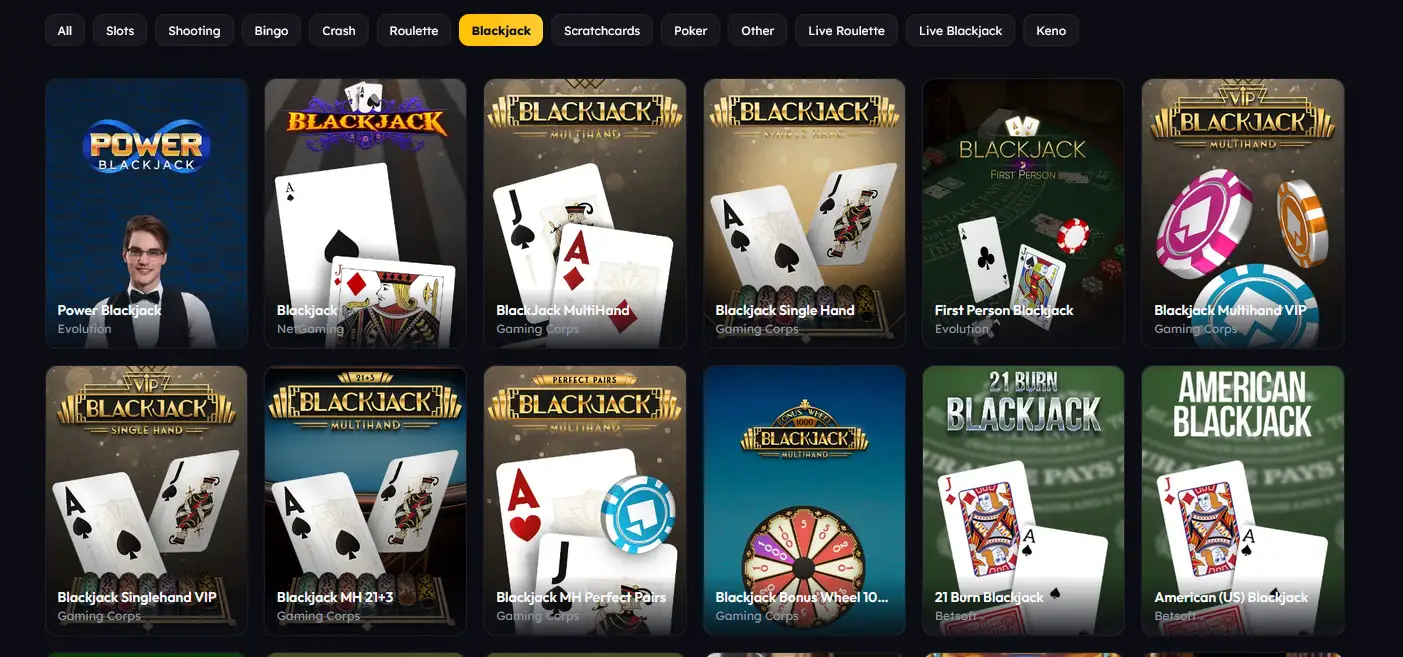
Blackjack, roulette, baccarat, video poker, and poker variants all operate in the mobile browser. Multi-hand formats and side-bet options function the same way as on desktop.
Progressive jackpot pokies are included in the mobile catalogue. The live jackpot prize meter displayed on eligible titles updates in the browser in real time.
The SweepLasVegas mobile experience applies the same security infrastructure as the desktop site.
All data transmitted between a player’s mobile browser and the SweepLasVegas platform is protected by SSL encryption. This includes login credentials, account details, coin balance updates, and any optional payment information submitted during a Gold Coin purchase.
SweepLasVegas does not currently offer two-factor authentication as a standard account feature. Account security rests on the email-and-password login method, making a strong unique password and secure email account essential safeguards.
Biometric login (Face ID or fingerprint unlock) is not natively supported through the browser-based experience. However, if your mobile browser or device password manager is set up to fill login credentials using biometrics, that function applies at the SweepLasVegas login page as it would on any other site, providing a biometric-assisted sign-in without the platform itself needing to support it directly.
Registration on mobile follows the same process as on desktop. Navigate to sweeplasvegas.app, tap the register button, and complete the form with your name, email address, date of birth, and a chosen password. After tapping submit, a verification link is sent to the registered email address. Tapping that link in your mobile email app returns you to the site with the account active and the signup reward of 10,000 Gold Coins and 1 Sweep Coin credited automatically. No purchase is required. 18+ only.
On subsequent visits, tap the login button on the homepage, enter your registered email and password, and tap sign in. If you have added the site to your home screen, tapping that icon launches directly to the login screen. For a full guide to login troubleshooting, including forgotten passwords and account recovery, visit the login page.
Optional Gold Coin packages can be purchased in the mobile browser using the same payment methods available on desktop. All transactions go through the standard cashier interface, which is fully touch-optimised.
| Method | Use | Processing Time |
|---|---|---|
| Visa / Mastercard | GC purchases | Instant |
| Apple Pay | GC purchases | Instant |
| Google Pay | GC purchases | Instant |
| Bitcoin / USDT / USDC | GC purchases | Near-instant |
| ACH Bank Transfer | SC prize redemptions | Up to 5 business days |
SC prize redemptions via ACH Bank Transfer require identity verification to be completed first. Once the government-issued photo ID (driver’s licence or passport) has been approved, subsequent redemptions typically process within 1 to 5 business days. All payment data entered in the mobile browser is protected by SSL encryption.
The signup reward of 10,000 Gold Coins and 1 Sweep Coin is identical whether the account is created on a desktop browser or a mobile browser. Registering through the mobile browser is equally eligible and the bonus is credited to the account balance immediately after email verification. The Daily Spin Wheel is available from the first mobile login, with no restriction on which device is used to claim it. 18+ only. T&Cs apply.
For the complete breakdown of all active promotions, wagering conditions, and VIP Club tier benefits, see the full bonus terms.
The support team is reachable by email at [email protected]. The site also has a comprehensive FAQ section covering the most common questions about accounts, coin purchases, SC redemptions, game access, and responsible gaming. Social media channels on Instagram, X (formerly Twitter), and TikTok provide an additional contact route, though response times there are slower than email.
SweepLasVegas provides responsible gaming tools accessible from within the account on both desktop and mobile. Players can set spending limits on optional Gold Coin purchases, apply session time limits, activate a cooling-off period, or request self-exclusion. These tools are available to all registered accounts and can be adjusted at any time through the account settings section. Minimum age to register and play is 18.
Mobile App Questions Answered
No. SweepLasVegas does not have a native app listed on the Google Play Store or the Apple App Store. The platform is delivered as a fully mobile-optimised browser site at sweeplasvegas.app, which works across all current Android and iOS devices.
No download is required. All pokies, including titles from NetEnt, Nolimit City, Big Time Gaming, and 30+ other studios, stream directly in the mobile browser. Games load quickly and run without any separate installation.
Open sweeplasvegas.app in Safari, tap the share icon at the bottom of the screen, and select Add to Home Screen. The shortcut launches the site in full-screen mode, removing the browser navigation bar, so it closely resembles a native app experience.
Start Playing on Mobile Today
Grab 150% up to A$10,000 and 100 free spins.
Enter the Casino You must be 18 or older to play. Please play responsibly - bonus terms and conditions apply.